
What to do when your event sells out: share your calendar anyway
By Kelsey Gilbert-Kreiling | Co-founder, Eventually
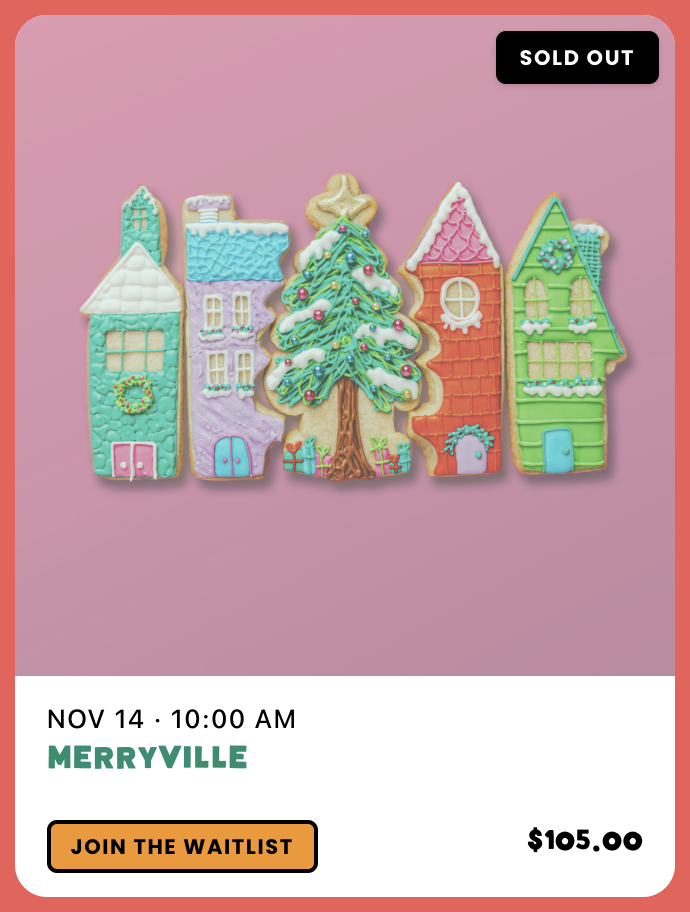
The short answer: Keep sold-out events on your calendar, clearly marked, and keep sharing that calendar. A full date is proof that people want what you offer. Then give every visitor who lands on it somewhere to go next: a waitlist for that date, or the next date with open seats.
The instinct to hide sold-out events
When a class fills up, the natural move is to take it down. Unpublish the product. Stop posting about it. Nobody wants a guest clicking through only to find there's no room.
On Squarespace, the tools only get you partway. Product waitlists can collect emails on a sold-out product page, but your calendar page doesn't know which dates are full, and an embedded Google Calendar can't show it either. So the event quietly disappears, and with it goes the most persuasive thing on your site.
A sold-out event is the best evidence you have that your events are worth booking. Hiding it throws that evidence away.
Why sold-out dates work as social proof
A first-time visitor who sees a calendar with a few full dates learns three things without reading a word of copy: people really come, these fill up, and booking early is smart.
That changes how they treat the dates that are still open. An open seat next to a full date feels like something to grab. An open seat on a calendar with no sold-out dates feels like something that can wait.
One rule keeps this honest: only show sold out when it's true. Real demand builds trust. Invented scarcity burns it, and guests can tell.
Then route the demand
Proof gets attention. Routing turns it into revenue. Everyone who lands on a full date should see one of two clear paths:
Join the waitlist for this date. For guests who want this specific class, and for filling seats when someone cancels.
Book the next date with open seats. For guests who are flexible, which is often most of them.
If neither path is visible, they leave. If both are one click away, a sold-out event keeps selling for you.
How to share your calendar when events sell out
1. Keep the sold-out event visible
Leave it on your calendar with a sold-out label. Don't delete it, and don't move it to a hidden page.
2. Turn on a waitlist for popular events
If an event has sold out before, assume it will again. Have the waitlist ready before the event fills, not after.
3. Put the next date close by
For recurring classes, a list or month view places the full date right next to the open ones. Guests see their other options without searching.
4. Share the calendar page, not the single event
Point your link in bio, your newsletter, and your partners to the calendar page. That link stays useful after any one event fills up, and it shows full and open dates together.
5. Say it plainly when you post
Something like: "Saturday's workshop is full. Thursday has four spots left, and there's a waitlist for Saturday if a seat opens up." One sentence gives proof, a next date, and a waitlist.
How sold-out events work in Eventually
Eventually is event ticketing for calendar-centric businesses, built as a Squarespace-first extension. Its calendar widget embeds on your own Squarespace pages in month, list, or card view, and checkout runs through your Squarespace Payments or Stripe account.
Sold-out status shows at two levels. When an event reaches its total capacity, visitors see that it's at capacity. When one ticket type sells out but others remain, only that type shows as sold out, so a guest who missed the early tier can still buy general admission. When no seat is available, visitors see a sold-out message or a waitlist option.
Waitlists can be turned on per event or set as a team default for new events. When a seat opens, you promote guests from the waitlist. Recurring events keep the next dates on the calendar beside the full ones.
More in the Sold-out waitlist and guest list guide and How capacity and "sold out" work
Designer Kristine Neil, a member of Eventually's Founding Circle, built this kind of shared calendar for Explore Washington Park in Portland, a 410-acre public park that's home to the Oregon Zoo, Hoyt Arboretum, World Forestry Center, International Rose Test Garden, and Portland Japanese Garden. Each attraction runs its own events, and they're "now collected in one place" on a single events page.
What to do right now
If something just sold out: Put it back on your calendar, marked sold out, and post the next date alongside it.
If your events sell out regularly: Turn waitlists on by default so you're never setting one up after the fact.
If it's a one-time event: Keep the waitlist anyway. It refills cancellations, and the length of the list tells you whether to run it again.
If you promote mostly on Instagram: Point your link to the calendar page, so every post leads somewhere current.
The bottom line
A sold-out date is the best review you'll ever get, and nobody had to write it.
Leave it where people can see it, and put the next step right beside it. The guests who missed this one are the easiest ones to book for the next.
Keep reading:
→ How to run an event pre-sale (and turn your waitlist into new dates)
→ Squarespace Event Calendar Widget: Your Options Compared
See it in action:
Keep your full dates working for you
Add waitlists and a calendar that shows full and open dates side by side on your own Squarespace site. Get started at eventuallyticketing.com.