Event Ticketing for Nonprofits on Squarespace
The honest answer: Squarespace doesn’t have built-in event ticketing, which means nonprofits on the platform have to choose between external ticketing platforms with per-ticket fees, DIY workarounds using Commerce products, or purpose-built extensions. For nonprofits—where every dollar matters and fees directly reduce mission impact—this choice has real consequences. Here’s what actually works, what costs what, and how to protect more of your fundraising revenue.
Death by a thousand paper cuts
At Week of the Website, we’ve built Squarespace sites for nonprofits for over a decade. And every time we work with a nonprofit organization, we have an eye toward cost. Every product we integrate, every tool we recommend—we try to negotiate better pricing, find nonprofit discounts, reduce fees wherever we can. Because we know how fast those costs add up for organizations running on tight budgets.
We’d find nonprofit pricing for email platforms. We’d negotiate hosting costs. We’d build as much as possible within Squarespace to avoid stacking monthly subscriptions. And then we’d get to ticketing.
That’s where it always got hard.
Processing fees are unavoidable—credit card companies take their cut regardless. But on top of that, every major ticketing platform adds its own per-ticket service fee. And our nonprofit clients always asked the same question: “Is there a way around this?”
Usually, the answer was no. And it added friction to every single engagement. Not the dramatic, deal-breaking kind of friction. The slow, grinding kind. Death by a thousand paper cuts. A dollar here, two dollars there, multiplied across hundreds of tickets for a gala or a fundraiser or a community event. All we could think about was the impact on how much support they could actually bring to their causes.
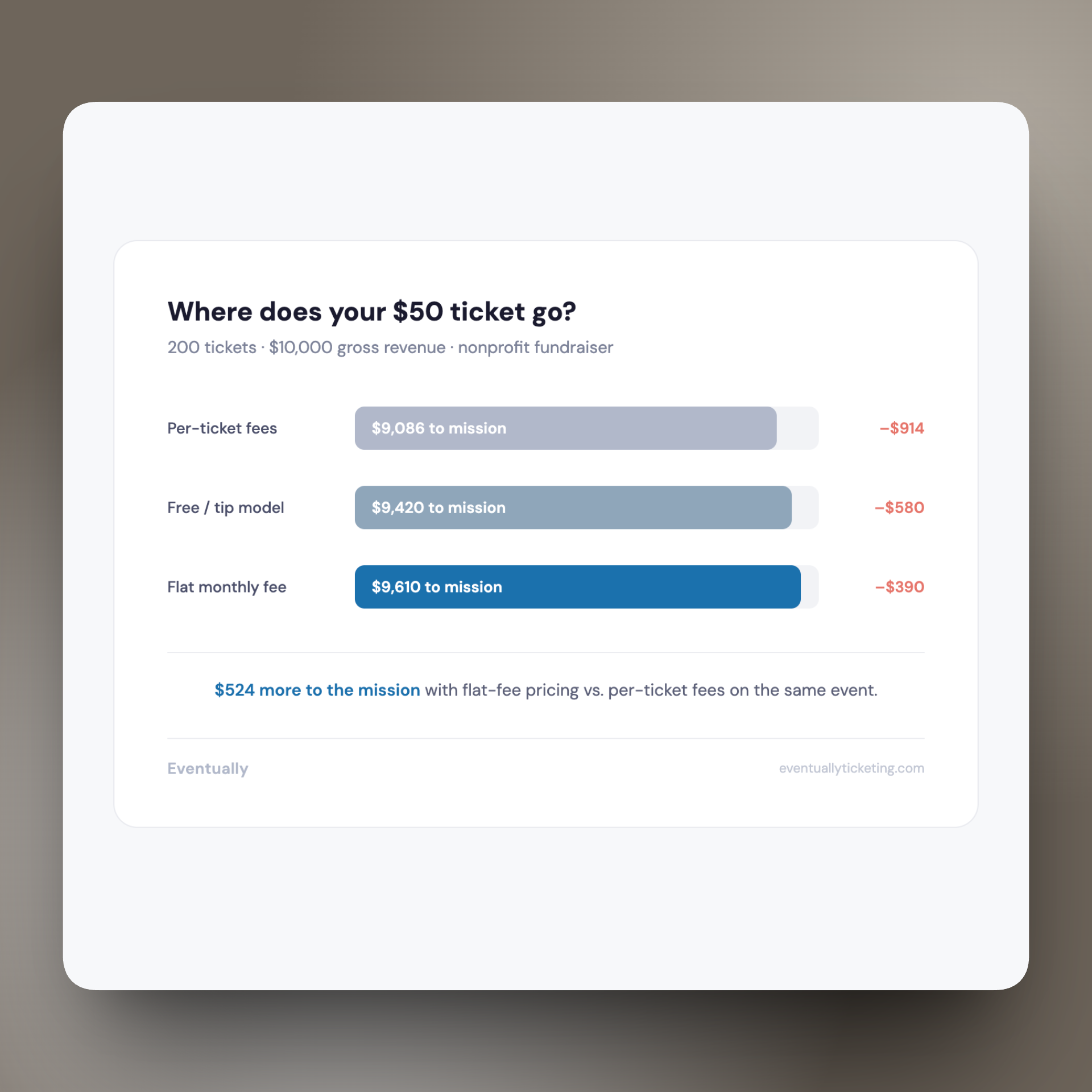
A $50 fundraiser ticket on Eventbrite doesn’t deliver $50 to the nonprofit. After Eventbrite’s service fee and payment processing, it delivers somewhere around $46. Sell 200 tickets to a gala and that’s $800 that went to a ticketing platform instead of the mission. For a small nonprofit, $800 is a month of programming. It’s supplies for a food bank. It’s a scholarship.
That math never sat right with us. And it shouldn’t sit right with anyone building for nonprofits.
Why nonprofit event ticketing on Squarespace is genuinely hard
Nonprofits didn’t end up on Squarespace by accident. They chose it because the design quality communicates credibility, the editing experience doesn’t require a developer on staff, and the cost is predictable. For an organization where a board member or volunteer often maintains the website, Squarespace makes sense.
But Squarespace has no built-in event ticketing. That’s not a bug in your setup—it’s a gap in the platform. And for nonprofits, this gap creates a specific set of problems that hit differently than they do for commercial businesses:
Fee sensitivity is existential, not preferential. When a for-profit business pays per-ticket fees, it’s a cost of doing business. When a nonprofit pays per-ticket fees, it’s money directly subtracted from their mission. Donors and supporters feel this too—nobody wants their contribution going to a ticketing platform.
Free events are as important as paid ones. Nonprofits run community events, volunteer orientations, donor appreciation gatherings, and public programs that don’t charge admission but still need RSVP tracking, capacity management, and attendee communication. Most ticketing platforms are built for paid events first. Free event support is an afterthought.
Brand trust matters more than aesthetics. For a nonprofit, sending supporters to an external checkout page isn’t just a design inconsistency—it’s a trust problem. Donors are cautious with their money. A redirect to Eventbrite or an unfamiliar checkout page introduces doubt at the exact moment you need confidence.
Attendee data is donor data. Event attendees are often donors, volunteers, or future board members. When attendee data lives in Eventbrite’s system instead of your own, you’re losing the ability to build long-term relationships with the people who showed up to support your cause.
What per-ticket fees actually cost a nonprofit
Let’s make this concrete. Here’s what a typical nonprofit event looks like on the most common ticketing platforms:
A nonprofit gala: 200 tickets at $75 each. That’s $15,000 in gross ticket revenue.
Eventbrite: Eventbrite fees:
Eventbrite charges 3.7% + $1.79 per ticket, plus payment processing. On a $75 ticket, that’s roughly $4.57 per ticket in platform fees alone. Across 200 tickets: approximately $914 in fees. That’s over 6% of your gross revenue going to the ticketing platform—before payment processing.
Ticket Tailor: Ticket Tailor fees:
Ticket Tailor charges $0.26–$0.65 per ticket depending on your plan. On the same 200-ticket gala: $52–$130. Better, but still a per-ticket charge that scales with your success.
Flat monthly fee (no per-ticket charges): A flat subscription model:
A tool charging $25–$39/month with no per-ticket fee costs $300–$468 per year regardless of how many tickets you sell. Sell 200 tickets or 2,000—the cost doesn’t change. For nonprofits running multiple events per year, the savings compound fast.
The per-ticket model punishes success. The more tickets you sell—which is the whole point of a fundraiser—the more you pay. For nonprofits, a flat-fee model means every additional ticket sold goes entirely to the mission.
Your actual options for nonprofit event ticketing on Squarespace
Here’s every real option, with honest tradeoffs. We’ve implemented all of these for nonprofit clients over the years.
Option 1: Eventbrite
The most well-known option. Create events on Eventbrite, embed a widget or link from your Squarespace site.
What works: Full-featured event management. Handles registration, capacity, multiple ticket types, confirmation emails. Supports free events. Has nonprofit-specific features and some fee discount programs. Large platform with built-in discovery.
What breaks: Per-ticket fees add up fast on fundraising events. Checkout redirects supporters to Eventbrite’s site, breaking your brand experience. Eventbrite retains attendee data and markets to your supporters. Payout timing can be unpredictable—BBB complaints document organizations waiting months for funds. The embed widget requires CSS hacking to match your Squarespace design.
Best for: Nonprofits that need Eventbrite’s built-in discovery and marketing tools, and where the fee structure is acceptable relative to ticket prices.
Option 2: Zeffy (100% free for nonprofits)
Zeffy offers completely free ticketing for nonprofits, funded by optional tips from ticket buyers.
What works: Zero platform fees—genuinely free. No per-ticket charges, no monthly subscription. Handles registration, capacity, and confirmation emails. Built specifically for nonprofits. Donors can optionally tip Zeffy at checkout to support the platform.
What breaks: It’s still an external platform—checkout happens on Zeffy’s site, not yours. The tip prompt at checkout can feel awkward for some organizations and donors. Limited customization for the event page and checkout experience. No Squarespace integration—events live entirely in Zeffy’s system. Design quality doesn’t match a polished Squarespace site.
Best for: Budget-constrained nonprofits where eliminating every possible fee is the top priority, even at the cost of brand consistency and checkout experience.
Option 3: Squarespace Commerce (DIY workaround)
Create events as Squarespace service products and sell tickets as variants through your existing Squarespace checkout.
What works: Checkout stays on your site. Payments process through Squarespace Payments. No additional platform fees beyond Squarespace’s standard payment processing (2.9% + $0.30 for most plans). Your brand stays intact throughout the purchase.
What breaks: No event-specific features. No attendee management—you get order data, not attendee data. No confirmation emails with calendar invites. No capacity management beyond basic inventory tracking. No recurring event support. No calendar widget. No check-in tools. You’re using a commerce system designed for products, not events. It works, technically. But you’ll be managing everything else—attendee lists, communications, check-in—manually.
Best for: Nonprofits running occasional simple events (one ticket type, no complex attendee tracking) who prioritize keeping checkout on-site and are willing to handle event management manually.
Option 4: Givebutter
Givebutter is a fundraising platform with event ticketing built in, designed for nonprofits.
What works: Built for nonprofits with fundraising-first features. Includes donation collection alongside ticket sales. Social fundraising tools. Low fees (processing fees only on the free tier, with a tip model similar to Zeffy).
What breaks: Another external platform—event pages and checkout live on Givebutter, not your Squarespace site. Limited design customization. You’re maintaining two systems (Squarespace for your website, Givebutter for events). Attendee data lives in Givebutter’s system.
Best for: Nonprofits where fundraising and ticketing are deeply intertwined—galas with donation components, peer-to-peer fundraising events, campaigns where the event is part of a larger fundraising push.
Option 5: Google Forms + manual management
Create a Google Form for RSVP or registration, embed or link from your Squarespace site, manage responses in Google Sheets.
What works: Free. Flexible form fields—collect whatever information you need. Works for free events where no payment is involved. Familiar tool for most nonprofit staff and volunteers.
What breaks: No payment processing. No capacity management—forms don’t close when you’re full. No confirmation emails with event details or calendar invites. No attendee dashboard. No check-in tools. Managing a Google Sheet of RSVPs for a 200-person event is exactly as painful as it sounds. And it looks like a Google Form on a Squarespace site, because it is one.
Best for: Small free events (under 50 attendees) where the overhead of any platform isn’t justified and a volunteer can manage a spreadsheet.
What nonprofit event ticketing should actually look like
Before introducing any specific tool, here’s what a nonprofit running events on Squarespace actually needs:
No per-ticket fees — a predictable cost that doesn’t scale with your success
On-site checkout — supporters stay on your Squarespace site through the entire purchase, maintaining trust
Free event support — RSVP and registration for community events that don’t charge admission
Attendee management — a single dashboard showing who’s coming, with search, export, and communication tools
Automated confirmations — emails with event details and calendar invites, sent without manual effort
Multiple ticket types — general admission, VIP/sponsor tables, early bird pricing, sliding scale options
Capacity management — automatic cutoff when you’re full, with waitlist capability
Check-in tools — something that works at the door on event day without juggling printed lists
Brand consistency — the entire experience looks and feels like your organization, not a third-party platform
Calendar display — an embeddable calendar widget showing your event schedule on your site
No single external platform checks all of these boxes while keeping the experience inside Squarespace. That’s the gap.
Eventually: flat-fee event ticketing built for Squarespace Commerce
This is why we built Eventually. Not because we wanted to build another ticketing platform—but because after a decade of watching nonprofit clients lose money to per-ticket fees and cobble together workarounds, we knew what the right answer looked like.
Eventually is a Squarespace extension that adds event ticketing directly to Squarespace Commerce. Events are created as service products in your Squarespace catalog. Tickets sell as variants through your existing Squarespace checkout. Payments process through Squarespace Payments. No external redirects. No brand fragmentation. Your supporters stay on your site from the moment they discover the event through the moment they complete their purchase.
The pricing model is a flat monthly subscription with no per-ticket fees. Sell 50 tickets or 500—the cost to your nonprofit doesn’t change. Every additional ticket sold goes entirely to your mission, not to a ticketing platform. For nonprofits running multiple events per year, that math matters.
Eventually also supports free event registration—RSVP capture, attendee tracking, and confirmation emails for community events that don’t charge admission. The free tier includes a calendar widget and free event support, so organizations that primarily run community programming can start without a paid subscription.
Eventually is currently in pre-launch. You can join the waitlist for early access and founder pricing at eventuallyticketing.com.
$524 more to the mission with a flat-fee model vs. per-ticket pricing on the same event.
Scale that across multiple events per year, and the difference funds real programs.
What to do right now
Your next step depends on your nonprofit’s situation:
If you’re running one or two small free events per year: Google Forms is fine. Don’t overthink it. A volunteer with a spreadsheet can manage 30 RSVPs without dedicated software.
If you’re running a large fundraising gala and need the event live this month: Eventbrite or Givebutter will get you there. Factor the fees into your budget, consider passing platform fees to ticket buyers if your audience is comfortable with that, and focus on making the event successful.
If you’re fee-sensitive above all else and can accept an external checkout experience: Look at Zeffy. Genuinely free for nonprofits. The tradeoff is brand consistency and customization, but the price is right.
If you want to keep everything on your Squarespace site and can handle manual event management: The DIY Commerce workaround works for simple, occasional events. Create service products for events, variants for ticket types, and manage attendees from your orders panel.
If you’re building a nonprofit site and want to plan for a better long-term ticketing setup: Join the Eventually waitlist. We’re building specifically for this use case—flat fees, on-site checkout, free event support, and the event management tools nonprofits actually need.
If you’re a designer or agency building for nonprofit clients: Be upfront about the fee structures. Do the math with your client so they understand exactly what each option costs at their event volume. And advocate for tools that protect their fundraising revenue, not just tools that are easy to set up.
The bottom line
Nonprofit events aren’t just events. They’re how organizations fund their work, build their communities, and connect with the people who care about their mission. Every dollar that goes to a ticketing platform instead of the cause is a dollar that could have made a difference.
For ten years, we’ve watched nonprofit clients absorb those costs because there wasn’t a better option on Squarespace. We built Eventually to change that—flat pricing that doesn’t penalize success, on-site checkout that maintains donor trust, and free event support for the community programming that keeps nonprofits connected to the people they serve.
Every ticket should go to the mission. That’s the principle. Everything else is just building toward it.
Keep reading:
→ How to Sell Event Tickets on Squarespace
→ Squarespace Event Calendar Widget: Your Options Compared
Event ticketing that protects your fundraising revenue.
Join the waitlist for early access and founder pricing at eventuallyticketing.com.